Platform › Control Tower
Control Tower: what needs you, before it becomes a problem
Most mornings start with the same question: what has moved since yesterday, and what do I have to deal with first? Control Tower answers it from the record you already keep, across every project you run.
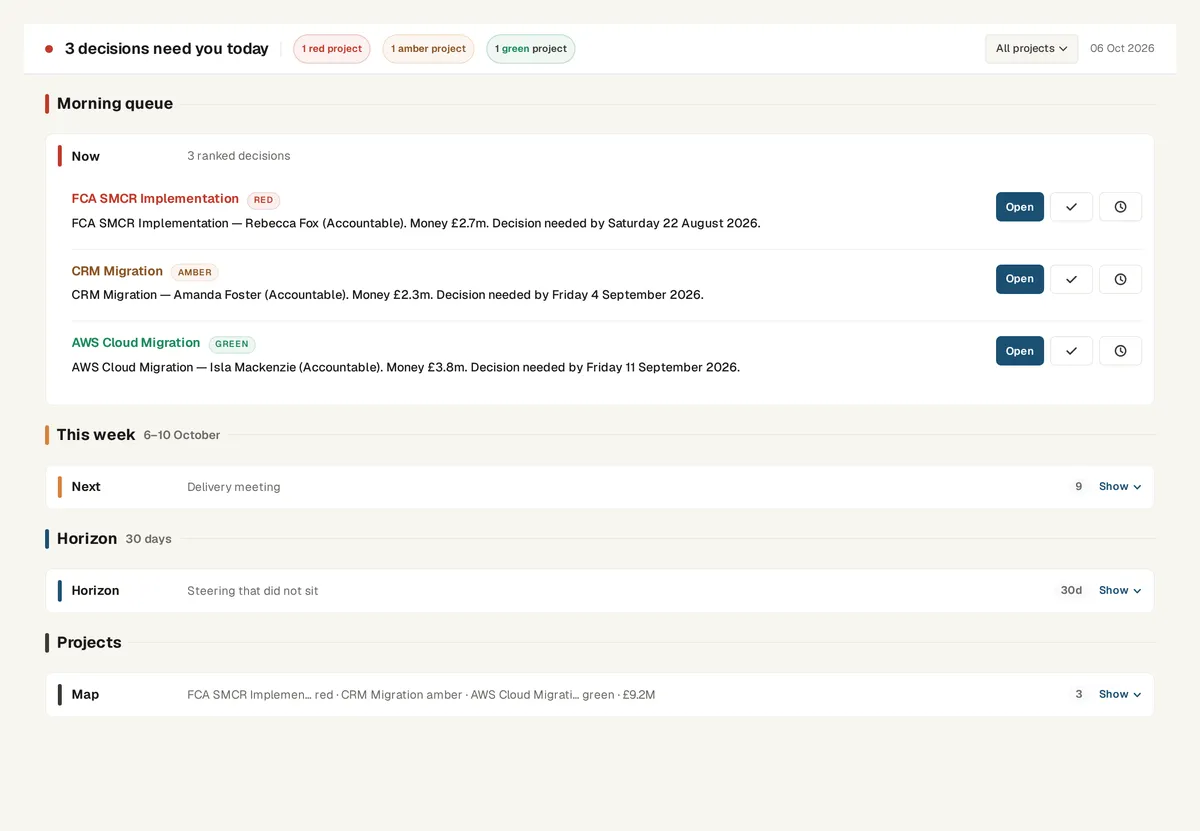
Three horizons, one page
Control Tower sorts the work into what needs you right now, what needs you within a week and what is coming within 30 days.
Each line comes with something to do: open it, assign it, update it or review it. It is a list of decisions, not a wall of red, amber and green.
Read from the record, not from a status update
The page is built from the plan, the RAID log, the finance figures and the people on each project. When an activity slips, a risk loses its owner or the forecast moves past the budget, it shows up here without anyone writing a status line.
- Overdue activities and slipped dates on the go-live path
- Risks and issues with no owner or no mitigation
- Forecast at completion running past the approved budget
- Decisions waiting for sign-off and gates coming up
One place to start the day
Control Tower is the page Senshin opens on. Questions go to Sensei, the assistant inside the platform; the list of what needs you stays in one place, so you are not checking two inboxes.
Open risks and issues also sit on a probability and impact grid. An issue has already happened, so it sits on the top row; a risk might still be avoided.
See it on your own project
Start with the sample projects or import your own plan, RAID log and budget.
Start your 14-day trialOr £499.90 a year. Every plan starts with a 14-day trial; after it, your work stays, read-only, until you subscribe. Cancel any time. Enterprise is priced per contract: talk to us.
Frequently asked questions
Does Control Tower replace a RAG status?
It sits above it. Each project still has a status, but Control Tower lists the specific things behind that status and what to do about each one.
Does it work across more than one project?
Yes. It reads every active project you can see, so a contract PM with several clients or a PMO lead with a portfolio gets one list.
Where does the information come from?
From the project record in Senshin: plan, RAID, finance, people and governance. You can import an existing plan, RAID log or budget to fill it.