Platform › RAID log
A RAID log that tells you what it means
A RAID log in a spreadsheet records risks well enough. What it does not do is tell you which three matter this week, which have no owner, and which are quietly getting worse. Senshin's RAID log does.
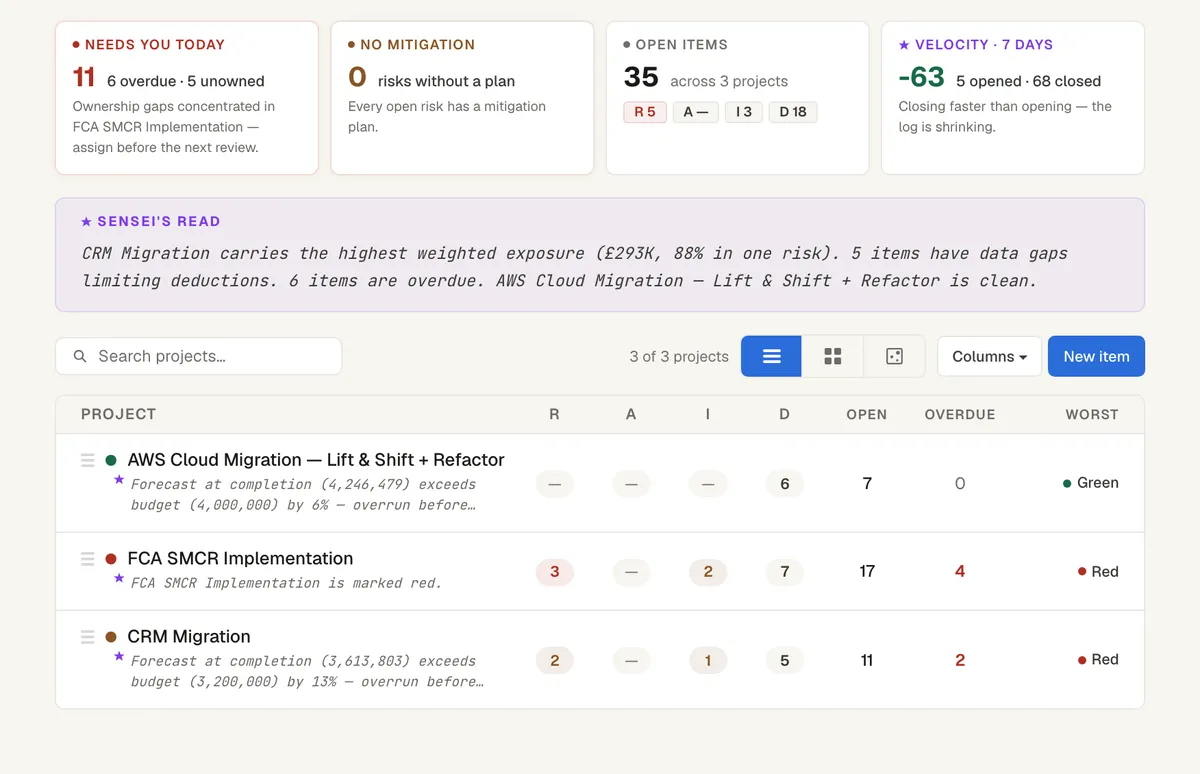
Risks, assumptions, issues and dependencies in one log
Each item has an owner, a due date, a probability and impact score and a treatment. Items sit on the same record as the plan and the money, so a dependency can point at the activity it holds up.
- What needs you today: overdue and unowned items, by project
- Risks without a mitigation plan
- Open items across all projects, split by risk, assumption, issue and dependency
- Whether the log is shrinking or growing over the last seven days
A written read, not just a table
At the top of the log, Sensei writes a short read in plain English: which project carries the highest weighted exposure, how many items have gaps that limit what it can work out, and which projects are clean.
You decide what to do. Senshin does the reading and the arithmetic.
It goes where your stakeholders already look
Open RAID items feed the Weekly report and the SteerCo pack automatically. You can also export the log to Excel when a client or a PMO asks for it in their own format.
Prefer a spreadsheet for now? Read the RAID log template.
See it on your own project
Start with the sample projects or import your own plan, RAID log and budget.
Start your 14-day trialOr £499.90 a year. Every plan starts with a 14-day trial; after it, your work stays, read-only, until you subscribe. Cancel any time. Enterprise is priced per contract: talk to us.
Frequently asked questions
What does RAID stand for?
Risks, assumptions, issues and dependencies. Some teams use decisions for the D; Senshin keeps decisions in their own log under governance.
Can I bring my existing RAID log?
Yes. Upload the spreadsheet and Senshin shows you what it found before anything is saved.
Can I export the RAID log?
Yes, to Excel or Word, as well as through the Weekly and SteerCo reports.