Platform › Plan and Gantt
A plan that shows what is holding up go-live
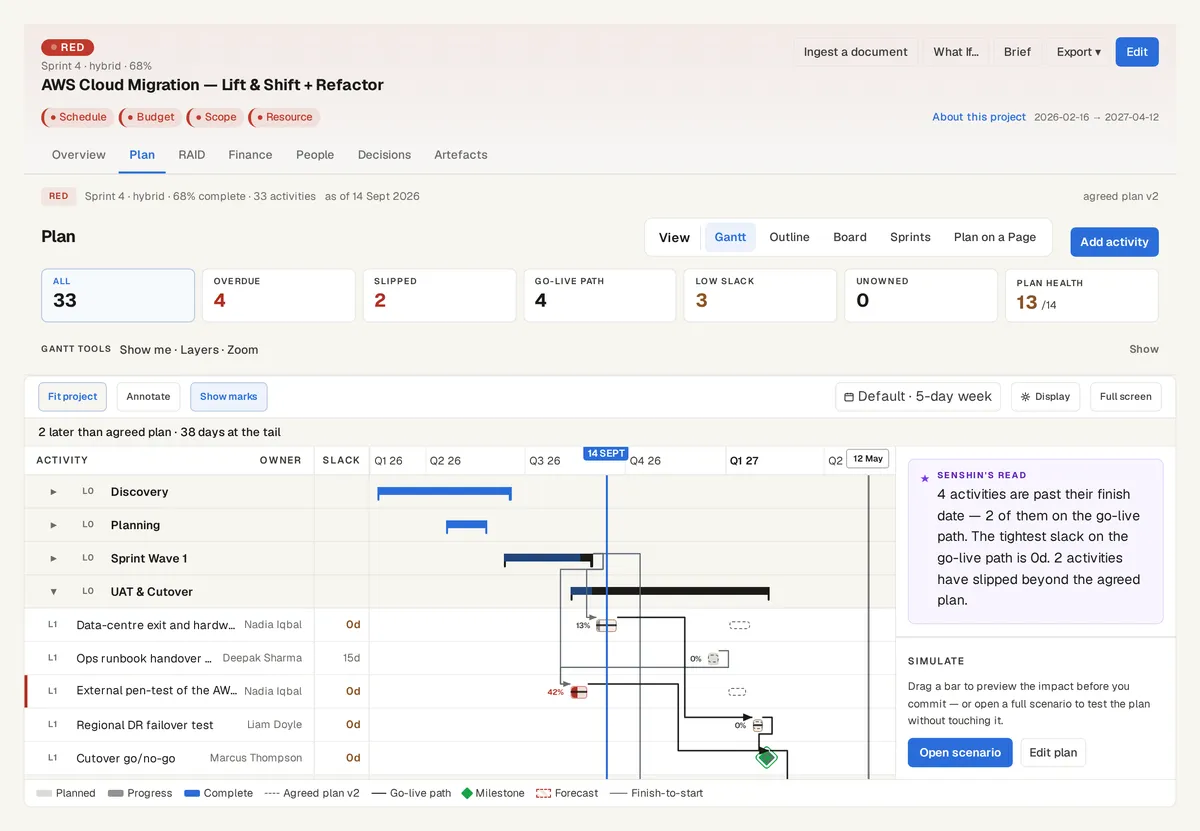
A Gantt chart shows dates. What a PM needs to see is which activities sit on the go-live path, how much slack is left and what has moved since the plan was agreed. Senshin's plan shows all of that on the same record as the risks and the money.
One plan, the views you already use
Gantt, outline, board, sprints and plan on a page all read the same activities. Projects can be set up as waterfall, agile or hybrid.
- Overdue and slipped activities
- The go-live path and low-slack activities
- Unowned work
- A plan health score
Dependencies and a critical path that keeps up
Activities are linked finish-to-start, start-to-start, finish-to-finish or start-to-finish, with lag where you need it. Change an activity's dates and the activities that depend on it move with it, so the links hold.
Senshin works out the critical path and the float on every activity again from those links each time the plan loads. Change a date, a duration or a link and the go-live path follows.
The agreed plan stays visible
Capture a baseline when the plan is agreed. Baselines are never overwritten, so today's bars always sit against what was promised, and you can compare any two.
Senshin's read sits beside the chart: how many activities are past their finish date, how many are on the go-live path and how tight the slack is.
Bring your existing plan
Import from Microsoft Project (.mpp), Excel or CSV, or from Jira and Asana exports. You see what Senshin found before anything is saved.
Prefer a spreadsheet for now? Read the Project recovery plan template.
See it on your own project
Start with the sample projects or import your own plan, RAID log and budget.
Start your 14-day trialOr £499.90 a year. Every plan starts with a 14-day trial; after it, your work stays, read-only, until you subscribe. Cancel any time. Enterprise is priced per contract: talk to us.
Frequently asked questions
Can I import a Microsoft Project file?
Yes. Senshin reads .mpp files, as well as Excel, CSV and Jira or Asana exports.
Does Senshin show the critical path?
Yes. Activities on the go-live path are marked, with the slack left on each.
Does the critical path update when the plan changes?
Yes. It is worked out again from the dependencies each time the plan loads, so a new date, duration or link shows up straight away.
Can I change many activities at once?
Not in one step today. You change one activity at a time, and the activities that depend on it move with it, so no link is broken. To bring in a lot of activities at once, import the plan from Microsoft Project, Excel or CSV.
Does it support waterfall and agile projects?
Yes. Each project is set up as waterfall, agile or hybrid, and you can change it later. Agile and hybrid projects have sprints and a board alongside the Gantt.