Compare › Comparison
Senshin vs Microsoft Project: which fits?
Microsoft Project builds the schedule; Senshin tells your sponsor what the schedule means. We are the vendor of Senshin, so we will try to be fair, including about where Microsoft Project is simply the better answer.
At a glance
Quick view of Microsoft Project and Senshin side by side, so you can see in a minute whether this is a real choice or two different jobs.
- Built for: detailed project scheduling and resource planning.
- Senshin is built for: one delivery record across plan, RAID, finance, people and governance.
- Strongest at: the schedule itself, task by task.
- Senshin is strongest at: reporting, portfolio health and what-if scenarios.
- Typical user: a planner or scheduler building the plan.
- Senshin typical user: a project manager, PMO or sponsor needing the whole picture.
What Microsoft Project is built for
Microsoft Project describes itself as project management software for planning and scheduling work, assigning resources and tracking progress. In plain terms, it is a scheduling engine with a long track record.
If your day is spent building and adjusting a detailed schedule, that focus is exactly what you want.
- Detailed scheduling: tasks, durations, dependencies and a Gantt view.
- Resource assignment and workload planning inside the schedule.
- Fits naturally into organisations that already run on Microsoft products.
- Familiar to many planners, so skills and templates travel with people.
Where Senshin fits
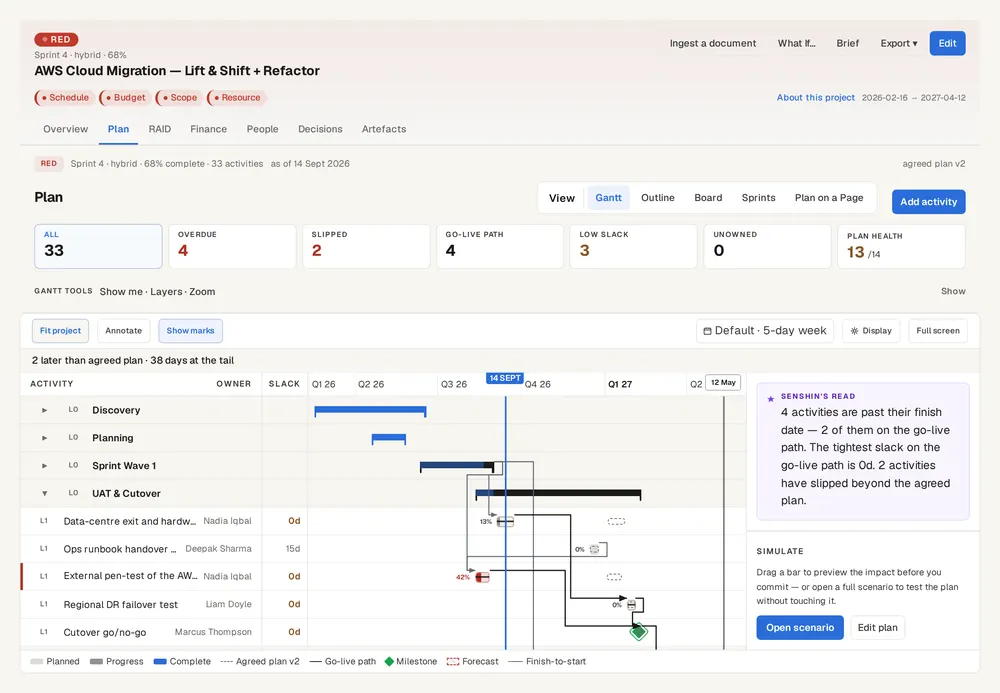
Senshin is a delivery intelligence platform that sits above your systems of record. It keeps one record for the plan, the RAID log, finance, people and governance, then produces reports and runs what-if scenarios from that single record.
The idea is simple: the system where work is done and the place where a delivery lead gets the honest picture do not have to be the same place.
- One record for plan, RAID, finance, people and governance, linked together.
- Weekly and SteerCo reports drawn from the live record, not retyped.
- Control Tower view of portfolio health across projects.
- What-if simulations to test a change before you commit to it.
- Sensei, the built-in assistant, to help draft and explore.
When Microsoft Project is the better choice
If the hardest part of your project is the schedule itself, Microsoft Project is likely the better home for it. Heavy scheduling with deep resource levelling is its home turf.
Senshin does include a plan and Gantt, but it is not trying to replace a specialist scheduling engine for the most complex builds.
- Very large or highly detailed schedules maintained by dedicated planners.
- Organisations standardised on the Microsoft stack who want tight integration there.
- Teams whose main need is task-level scheduling rather than cross-project reporting.
- Anyone with existing schedules, skills and governance built around the platform.
Who should pick which
Pick Microsoft Project when the schedule is the product of your work. Pick Senshin when the pain is stitching plan, risks, budget and people into something a steering committee can act on.
- Planner or scheduler: Microsoft Project.
- Project manager juggling reporting and governance: Senshin.
- PMO overseeing several projects: Senshin, with the schedule living wherever it already lives.
- Both roles in one organisation: use both.
Using them together
You do not have to choose. Senshin can import an existing plan through document ingestion, so you can bring in what you already have rather than rebuilding it.
Keep delivering in Microsoft Project if that is where your team works. Senshin then provides the wider record and reporting around it.
- Import the current plan into Senshin.
- Link risks, issues and decisions to the imported tasks.
- Add the budget and benefits alongside.
- Produce the weekly and SteerCo reports from one place.
See it on your own project
Fourteen days with the sample projects, or with your own plan, RAID log and budget. Then decide.
Start your 14-day trialWhere this lives in Senshin
Or £499.90 a year. Every plan starts with a 14-day trial; after it, your work stays, read-only, until you subscribe. Cancel any time. Prices exclude tax. Enterprise is priced per contract: talk to us.
Frequently asked questions
Is Senshin a replacement for Microsoft Project?
Not necessarily. Senshin is a delivery intelligence platform that sits above systems of record, and many teams keep their detailed schedule in Microsoft Project while using Senshin for the wider picture. We are the vendor of Senshin, so weigh this page accordingly.
Can I import a Microsoft Project plan into Senshin?
Senshin has document ingestion to import an existing plan, so you can start from what you have. Check the formats supported before you rely on a specific file type.
Which is better for a single complex schedule?
If the schedule itself is the challenge, a dedicated scheduling platform such as Microsoft Project is a strong fit, and we would say so even as the vendor of Senshin.
Who makes this comparison?
It is written by Senshin, so it is not neutral. We have tried to describe Microsoft Project in broad terms, from what the product says about itself.
More comparisons
Last updated: