Guides › Guide
Gantt chart template
A good Gantt chart looks like an answer. A bad one looks like a barcode that someone printed in a hurry. Here is the structure that keeps yours on the right side of that line.
Columns to include
Begin with the table on the left, because the bars on the right are as good as the data behind them. Keep it to the fields people actually read.
- ID and task name, indented to show the work breakdown structure.
- Owner: one named person.
- Start date, finish date and duration in working days.
- Predecessor: which task must finish or start before it.
- Percent complete, kept honest.
- Status or RAG, plus a notes column for the current blocker.
Build it in order
Resist the urge to start dragging bars. A Gantt chart is a drawing of decisions you have already made about scope and sequence.
- List deliverables from the work breakdown structure.
- Break them into tasks of a few days to a few weeks.
- Add dependencies between tasks.
- Estimate durations with the people who will do the work.
- Add milestones as zero-duration markers.
Show what matters
Not every line deserves equal attention. The reader wants to see the route to the finish date and where it is fragile.
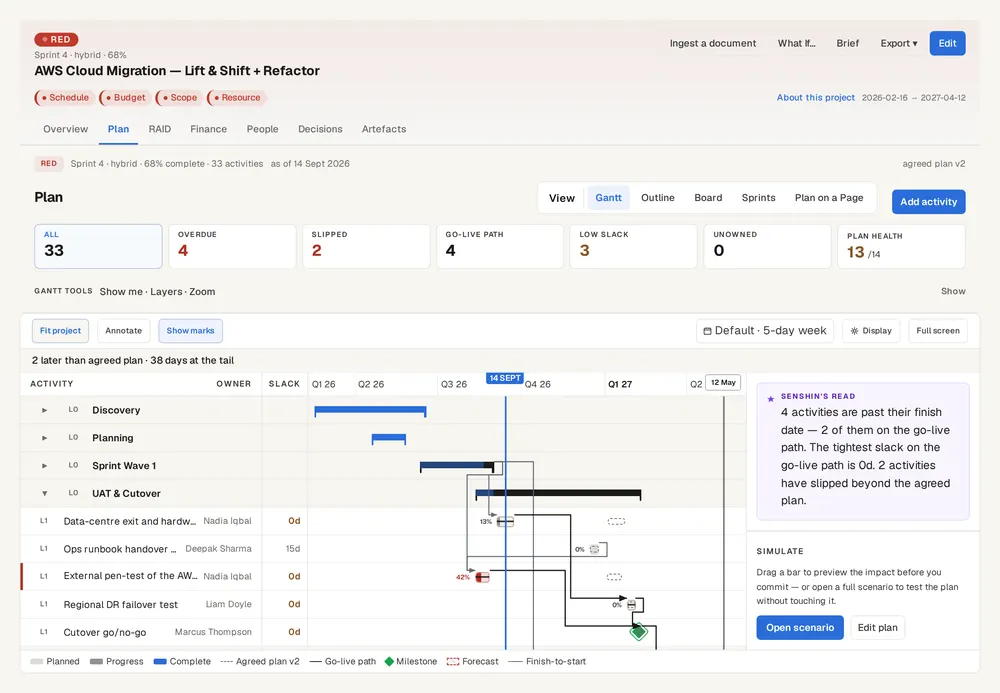
- Highlight the critical path so everyone sees which tasks drive the end date.
- Mark milestones with a diamond and a firm date.
- Show a baseline bar beneath the current bar to reveal slippage.
- Draw a today line.
- Use colour sparingly: one for complete, one for on track, one for late.
Keep it readable
A chart with 600 rows is a file, not a plan. Summarise for the steering committee and keep detail for the team.
- Offer a summary view at phase level for sponsors.
- Keep the working calendar correct: weekends and bank holidays.
- Do not link every task to every other; real dependencies alone.
- Review and update the chart weekly, before the status report.
Start from what you already have
If your plan lives in a spreadsheet or another file, Senshin can import it through document ingestion and draw it as a plan and Gantt, with the critical path highlighted.
Keep this live, not in a spreadsheet
Senshin keeps your plan, RAID, budget and reports in one place, so this stays current without a weekly copy-and-paste. A 14-day trial, with sample projects.
Start your 14-day trialWhere this lives in Senshin
Or £499.90 a year. Every plan starts with a 14-day trial; after it, your work stays, read-only, until you subscribe. Cancel any time. Prices exclude tax. Enterprise is priced per contract: talk to us.
Frequently asked questions
What should a Gantt chart include?
Tasks, owners, start and finish dates, durations, dependencies, milestones and progress. Add a baseline and a today line to make slippage visible.
What is the difference between a Gantt chart and a project plan?
A project plan is the full document of scope, resources, risks and approach. The Gantt chart is the schedule view within it.
How many tasks should a Gantt chart have?
Enough to manage the work and no more. Many teams keep tasks between a few days and a few weeks long, with a summary view for senior audiences.
Can I make a Gantt chart in a spreadsheet?
Yes, though dependencies and date changes become manual work. A dedicated platform recalculates dates and the critical path for you.
More guides
Last updated: