Guides › Guide
Milestone plan template
A milestone plan is the version of your project that a sponsor will actually read. Fifteen dated moments beat three hundred tasks, provided each one means something and has someone's name next to it.
What counts as a milestone
A milestone is a point in time with no duration, marking that something real has been achieved: a decision made, a deliverable accepted, a system live. If you cannot say how you would prove it has happened, it is a task wearing a costume.
Aim for roughly one milestone every two to four weeks on a long project. Fewer and you lose early warning; more and the plan becomes a task list again.
- Good: contract signed, design approved, go-live complete.
- Weak: build started, testing ongoing, work progressing.
- Each milestone ends something, rather than describing activity.
- Tie milestones to payments, approvals or stage gates where you can.
The template columns
Copy this table into a spreadsheet and give every milestone one row. The two date columns are the heart of it: the baseline never changes without approval, while the forecast changes whenever the facts do.
- ID and milestone name.
- Evidence of done: what will be seen, signed or demonstrated.
- Owner: one named person.
- Baseline date, agreed and held, and forecast date, updated every week.
- Variance in working days between the two, with RAG status and a one-line reason.
- Depends on: the milestone or task that must finish before it.
Setting honest dates
Work back from the dependencies, not forward from the wish. Count working days, and remove bank holidays and known leave, and add contingency where the estimate is uncertain rather than hoping. A date the team does not believe will not be hit.
- Ask the owner for the date, then ask what would make it late.
- Check each date against the critical path.
- Do not stack three milestones on the same day.
- Leave room before external deadlines.
Reporting slippage
Show the baseline, the forecast and the variance side by side, every week. A milestone that moves once is information; one that moves four times is a pattern the sponsor should hear about from you, not discover.
Move forecast dates freely and baseline dates through change control alone. Otherwise the plan quietly rewrites its own history and nothing ever looks late.
- Amber when the forecast has moved past tolerance.
- Red when the date will be missed without a decision.
- Record the cause of each slip in the RAID log.
- Show trend: closing or widening against baseline?
Where it lives
Keep the milestone plan one page, on top of the detailed plan, and make sure it is generated from it so the two cannot disagree. In Senshin milestones sit on the same plan and Gantt view as the tasks beneath them, so the summary and the detail share one set of dates.
- Review the list at every SteerCo.
- Retire milestones once achieved, but keep them visible as done.
- Add a milestone if a decision keeps being forgotten.
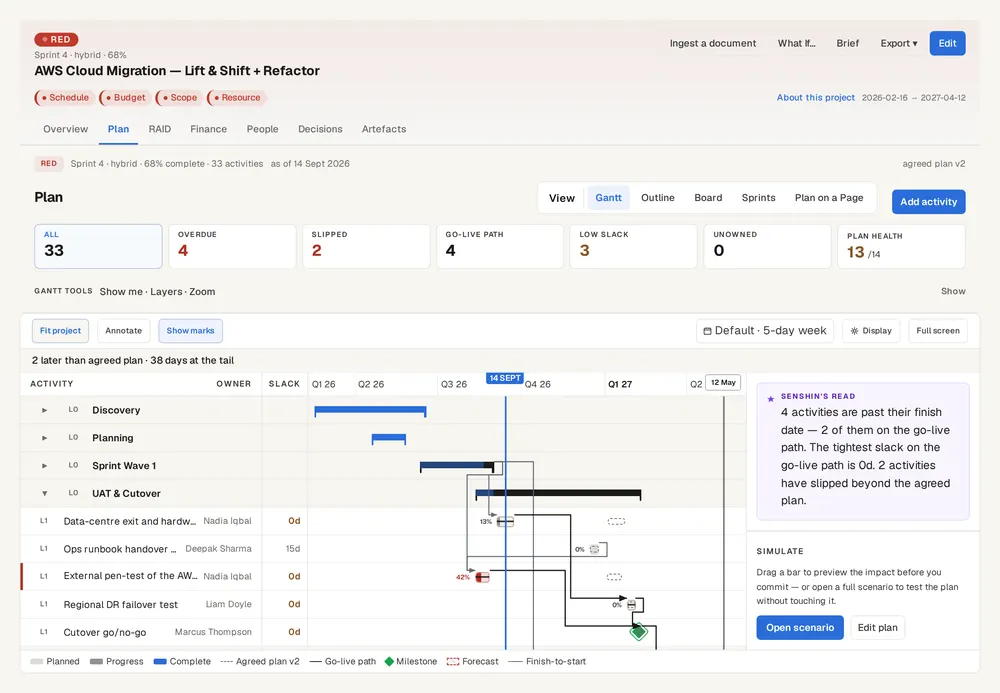
Keep this live, not in a spreadsheet
Senshin keeps your plan, RAID, budget and reports in one place, so this stays current without a weekly copy-and-paste. A 14-day trial, with sample projects.
Start your 14-day trialWhere this lives in Senshin
Or £499.90 a year. Every plan starts with a 14-day trial; after it, your work stays, read-only, until you subscribe. Cancel any time. Prices exclude tax. Enterprise is priced per contract: talk to us.
Frequently asked questions
What is a milestone plan?
A milestone plan is a summary schedule showing the key dated achievements of a project, each with an owner and evidence of completion, without the detail of individual tasks.
What is the difference between a milestone and a task?
A task is work with a duration. A milestone is a point in time that marks something achieved, such as an approval or delivery, and has no duration of its own.
How many milestones should a project have?
Enough to give early warning without becoming a task list. A common rule of thumb is one every two to four weeks on a long project.
How do I track milestone slippage?
Keep an approved baseline date and a separate forecast date for each milestone, and report the variance between them in working days every week.
More guides
Last updated: