Guides › Guide
RAG status definitions that stop the green-until-it-is-red problem
Every project is green right up until the meeting where it is suddenly red. The cure is not braver project managers, it is written RAG status definitions that make the colour a result rather than a mood. Here is a set you can paste into your reporting pack today.
Why RAG status needs written definitions
RAG stands for red, amber, green. On its own it is a feeling dressed as data: one manager's amber is another's red, and sponsors learn to ignore the colour entirely.
A definition turns the colour into a test. If the forecast end date is more than the agreed tolerance past the baseline, the status is red, whoever is reporting and however they feel about it.
- Agree the definitions with your sponsor before the project starts, not when the opening slip arrives.
- Write them into the project charter or reporting pack so they are not reopened every week.
- Use the same definitions across every project in the portfolio so the colours can be compared.
- Report the reason next to the colour, always, in one line.
Overall status: the three-colour test
Use the overall colour as a summary of the worst dimension below it, not an average. A project that is green on cost and red on schedule is red.
Keep the wording short enough to fit on a slide.
- Green: on track. Forecast within tolerance on every dimension, no open issue needs sponsor action.
- Amber: at risk. At least one dimension is outside tolerance or will be unless action is taken, and you have a plan to bring it back.
- Red: off track. A dimension is outside tolerance, recovery needs a decision from the sponsor or SteerCo, and you cannot fix it inside your own authority.
- Optional blue or grey: not started, on hold or closed, so that completed work does not pollute the colour counts.
Example thresholds by dimension
The numbers below are an example. Set yours with your sponsor, scaled to the size and risk of the project.
The point is that each line can be answered yes or no by anyone looking at the plan.
- Schedule: green is forecast finish on or before baseline; amber is up to 10 working days late; red is more than 10 working days late or a milestone the sponsor cares about is missed.
- Budget: green is forecast within 2% of approved; amber is 2% to 5% over; red is more than 5% over.
- Scope: green is no unapproved changes; amber is changes pending a decision; red is approved changes with no matching time or money.
- Risk: green is no risk scoring above your threshold; amber is a high risk with a mitigation under way; red is a high risk with no mitigation or one that has become an issue.
- Resources: green is all key roles filled; amber is a gap with a plan; red is a gap on the critical path.
Rules that keep the colours honest
Definitions work if the rules around them are firm. Three habits do most of the work.
Colours can move down quickly and up slowly: going back to green needs evidence, not optimism.
- Amber is allowed to be uncomfortable. If a status sits at amber for more than a few reporting cycles, treat it as red and escalate.
- Do not let a recovery plan change the colour; delivered results do.
- Show the trend arrow beside the colour so the sponsor sees direction as well as position.
- Review the definitions at each stage gate and record any change as a decision.
Where RAG status shows up
The same colours appear in your weekly status report, your SteerCo pack, your RAID log and your portfolio view. If each uses a different meaning, nobody will trust any of them.
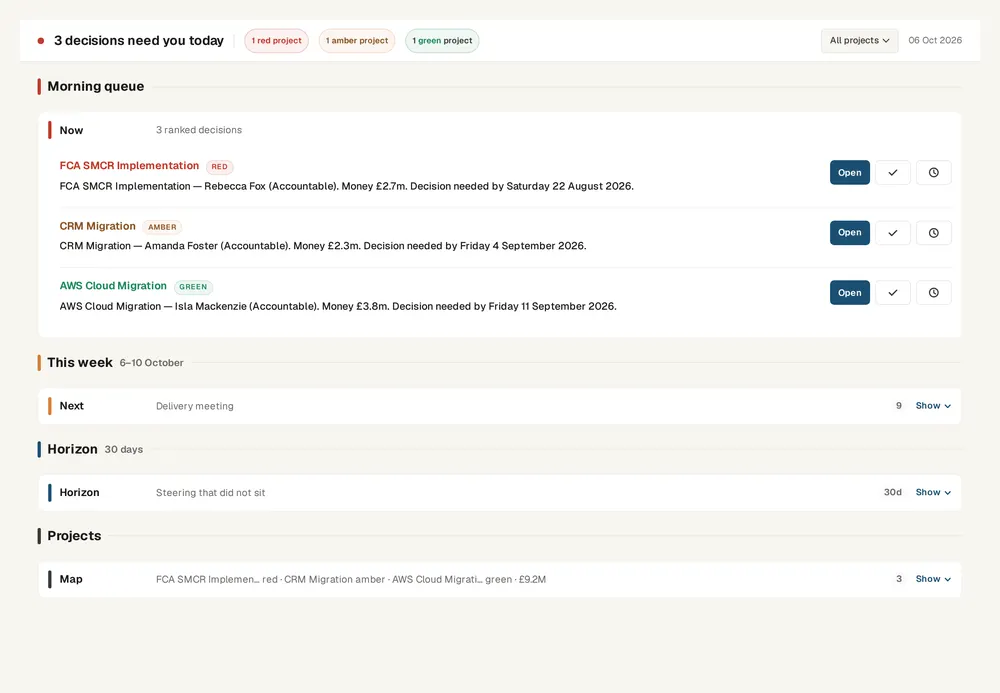
In Senshin the Control Tower rolls project health up into one portfolio view, and the weekly and SteerCo reports use the same status language, so the colour a sponsor sees in the pack matches the one in the project.
- Weekly report: overall colour plus one line of reasoning per dimension.
- RAID log: a colour per item so overdue actions stand out.
- Portfolio view: counts of red, amber and green by programme.
Keep this live, not in a spreadsheet
Senshin keeps your plan, RAID, budget and reports in one place, so this stays current without a weekly copy-and-paste. A 14-day trial, with sample projects.
Start your 14-day trialWhere this lives in Senshin
Or £499.90 a year. Every plan starts with a 14-day trial; after it, your work stays, read-only, until you subscribe. Cancel any time. Prices exclude tax. Enterprise is priced per contract: talk to us.
Frequently asked questions
What do red, amber and green mean in project status?
Green means on track within agreed tolerances, amber means at risk with a recovery plan under way, and red means off track and needing a decision from the sponsor or SteerCo.
What are good RAG status definitions?
Good definitions are numeric or yes/no, agreed with the sponsor in advance, and applied the same way to schedule, budget, scope and risk. Avoid wording such as concerns or some pressure that cannot be tested.
Should overall RAG be an average of the parts?
No. Take the worst dimension, because an average hides the problem that most needs attention. A project red on schedule is red overall.
How often should RAG status change?
Whenever the facts change, but at least at each weekly report. If a project stays green for months and then jumps to red, the definitions or the reporting habits need a hard look.
More guides
Last updated: