Guides › Guide
Work breakdown structure template
A work breakdown structure is the plan's family tree: start with the outcome, break it into parts, then break those into pieces small enough to estimate. Get it right and the Gantt chart almost writes itself.
Step 1: Start from deliverables, not activities
Begin with the end product at the top, then split it into the major deliverables. Describe things that exist when the work is done, such as Training materials or Migrated data, rather than verbs such as Train people.
Deliverables are easier to check, easier to assign and harder to forget.
- Level 1: the project, named as an outcome.
- Level 2: major deliverables or phases.
- Level 3: sub-deliverables.
- Level 4 and below: work packages, where needed.
Step 2: Apply the 100 per cent rule
The children of any item must add up to everything in the parent, with nothing missing and nothing extra. If you cannot describe a parent as the sum of its parts, there is a gap or an overlap.
This is the rule that stops scope creep sneaking in as an extra box, and stops the forgotten item turning up in month five.
- Check each level against the charter scope statement.
- Make sure each item appears under a single parent.
- Include project management and testing as deliverables, not afterthoughts.
Step 3: Number it and define each work package
A simple numbering scheme, such as 1, 1.1, 1.1.1, gives every item an address you can use in the plan, the cost lines and the RAID log. Then describe each lowest-level work package with a few standard fields.
- Number and name of the work package.
- Description and the definition of done.
- Owner: one person accountable for delivery.
- Estimated effort and duration, with the basis of the estimate.
- Predecessors and dependencies.
- Cost line or budget code.
- Key assumptions and risks.
Step 4: Know when to stop splitting
Stop when a work package can be estimated with reasonable confidence, assigned to one owner and tracked without ambiguity. A common rule of thumb is that a package should take somewhere between a few days and a few weeks.
Split further than that and you spend more time updating the plan than doing the work.
- Too big: you cannot say what done looks like.
- Too small: the status update takes longer than the task.
- Just right: one owner, one estimate, one clear finish.
Step 5: Turn it into a plan
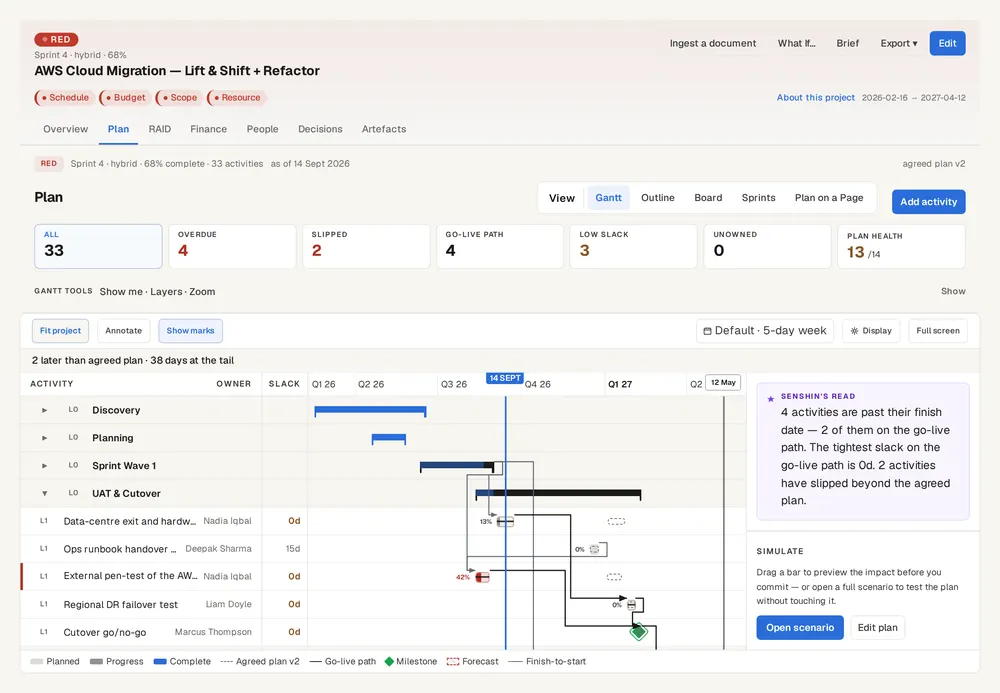
Once the structure is agreed, add durations and dependencies and you have the raw material for a schedule and the critical path. If you already have a plan in a spreadsheet or another platform, in Senshin you can import it through document ingestion and review the structure on the Gantt view.
- Add dependencies between work packages, not between levels.
- Roll up cost and effort from the bottom.
- Review the structure with the team, because they will find what you missed.
Keep this live, not in a spreadsheet
Senshin keeps your plan, RAID, budget and reports in one place, so this stays current without a weekly copy-and-paste. A 14-day trial, with sample projects.
Start your 14-day trialWhere this lives in Senshin
Or £499.90 a year. Every plan starts with a 14-day trial; after it, your work stays, read-only, until you subscribe. Cancel any time. Prices exclude tax. Enterprise is priced per contract: talk to us.
Frequently asked questions
What is a work breakdown structure?
It is a hierarchical breakdown of a project's scope into deliverables and work packages, so that all the work is identified, can be estimated and can be assigned to an owner.
What is the 100 per cent rule in a work breakdown structure?
The items beneath any parent must represent all of the parent's scope and nothing outside it, so the structure neither misses work nor includes extra.
How detailed should a work breakdown structure be?
Detailed enough that each work package can be estimated and owned by one person, and no more. Packages of a few days to a few weeks are a common guide.
What is the difference between a work breakdown structure and a Gantt chart?
The structure shows what must be delivered. The Gantt chart adds when, in what order and with what dependencies.
More guides
Last updated: