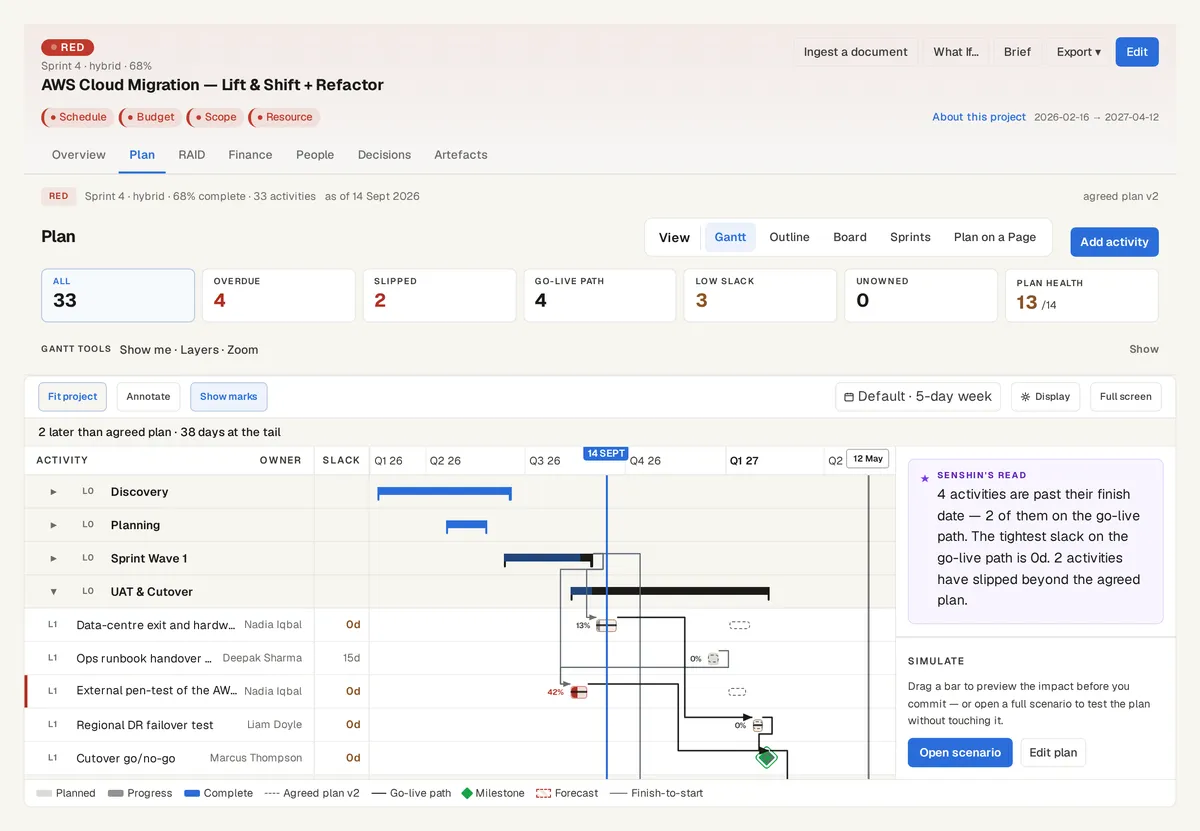
You already have the plan in MS Project. Senshin reads that file, tells you what it understood in plain English, and only then adds it to the project record next to the risks, money and people.
The plan on the AWS Cloud Migration sample, with the go-live path and the agreed plan behind it. Sample data, not a real customer.
What it reads
Tasks, milestones and the links between them, with lags and leads, plus owners from the resource sheet, percent complete and constraints.
MS Project files (.mpp, .mpt, .mpx) and MS Project XML. A plan file is read by rules with no AI call, so the same file always gives the same answer.
What you see before anything is saved
A review screen says what Senshin understood, how many tasks and milestones it found, and what it was not sure about.
Every item names the line it came from, for example Task UID 51. Nothing reaches your project until you press Accept, and Cancel leaves no data behind.
Dates you can trust
Lags are counted in working days on the England and Wales calendar, so a 16-hour lag is two working days.
A task that finishes on a weekend or a bank holiday is flagged. Drop a newer version of the plan later and Senshin shows what moved before you accept it.
See it on your own project
Start with the sample projects or import your own plan, RAID log and budget.
Or £499.90 a year. Every plan starts with a 14-day trial; after it, your work stays, read-only, until you subscribe. Cancel any time. Prices exclude tax. Enterprise is priced per contract: talk to us.