A plan can look finished and still have loose ends. When you bring a plan in, Senshin checks it on the review screen and names the tasks that need a look, before anything is added to your project.
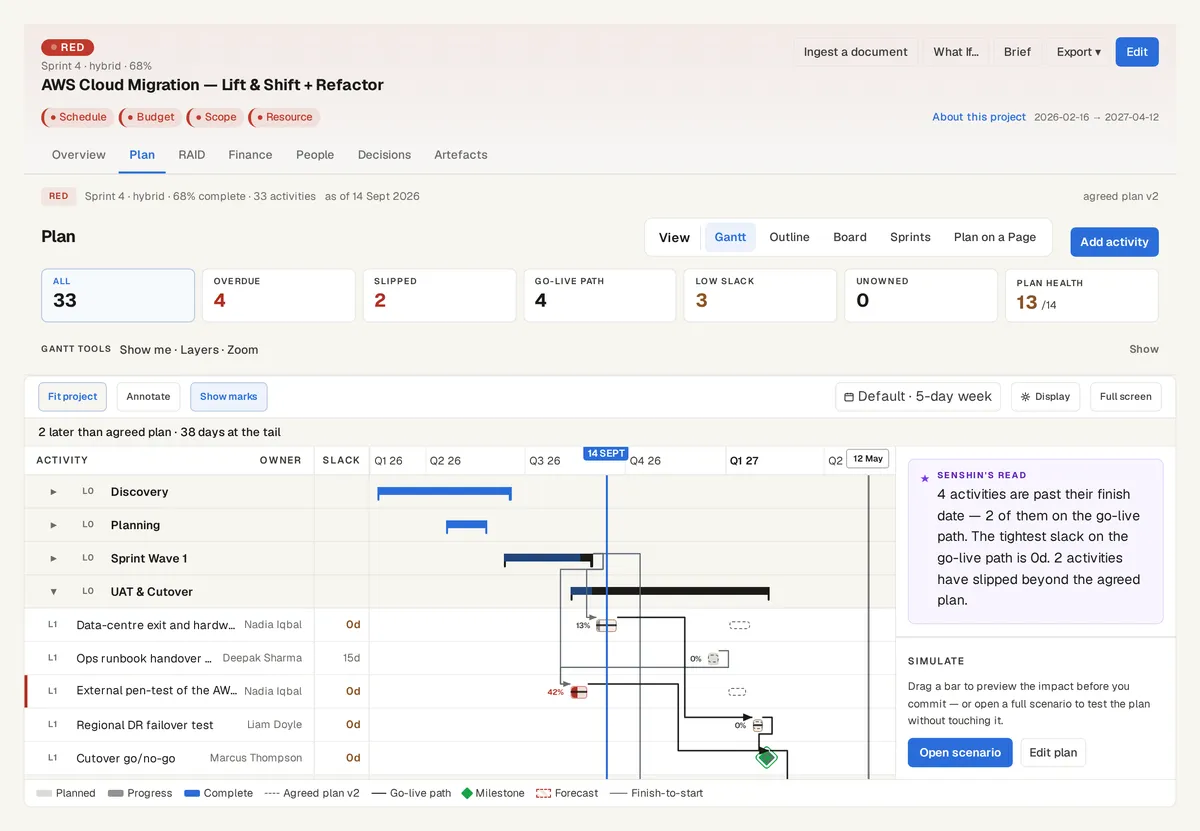
The plan on the AWS Cloud Migration sample, with the go-live path and the agreed plan behind it. Sample data, not a real customer.
The plan health check
Tasks tied to nothing, tasks with no successor, tasks nobody is doing, tasks that are unusually long, and dates that fall on a weekend or an England and Wales bank holiday.
Each finding opens the task and names the line it came from, for example Task UID 56.
The 14-point schedule quality check
Fourteen standard measures of how well a schedule is built, each shown as pass or fail with the failing tasks listed.
They cover logic, lags and leads, constraints, float, duration, missed tasks and whether the critical path holds when a task is stretched. It is worked out from your plan's own links and calendar, with no AI call.
What it does not do
It does not change your plan. It points; you decide.
Nothing is saved until you accept the import.
See it on your own project
Start with the sample projects or import your own plan, RAID log and budget.
Or £499.90 a year. Every plan starts with a 14-day trial; after it, your work stays, read-only, until you subscribe. Cancel any time. Prices exclude tax. Enterprise is priced per contract: talk to us.