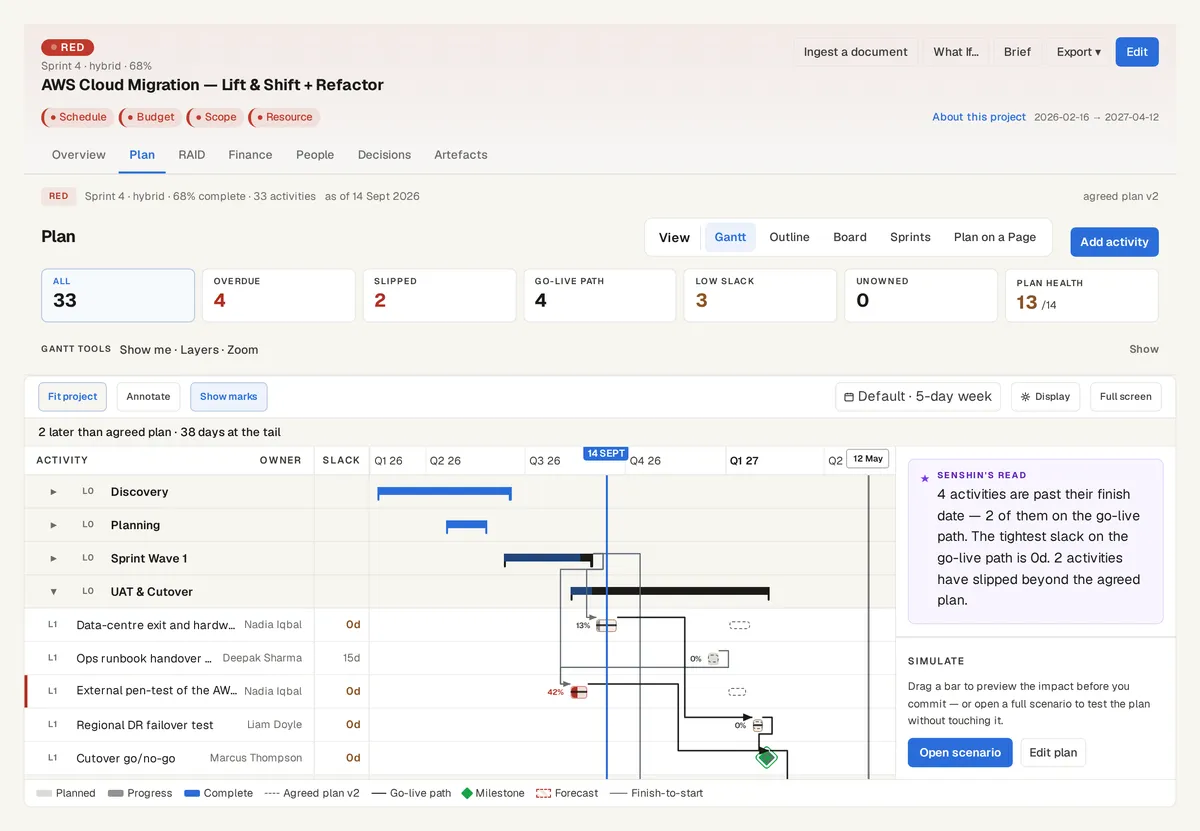
Export the schedule from Primavera P6 and drop the file into Senshin. You get the activities, milestones and relationships on a review screen first, with anything Senshin had to work out marked so you can check it.
The plan on the AWS Cloud Migration sample, with the go-live path and the agreed plan behind it. Sample data, not a real customer.
What it reads
Activities, milestones and relationships from a P6 export (.xer) or P6 XML, with the project start and the progress of each activity where the file states them.
Like every plan file, it is read by rules with no AI call.
When the file has no dates
Some exports hold durations and links but no dates. Senshin then works the dates out from the durations and links on the England and Wales working-day calendar, and says so.
Those dates are marked low confidence, because a worked-out date is the earliest possible one, not necessarily the one your planner chose.
Nothing is saved until you say so
The review screen shows what was understood and what was not. You accept it, change it or cancel it.
Each item names the line of the file it came from.
See it on your own project
Start with the sample projects or import your own plan, RAID log and budget.
Or £499.90 a year. Every plan starts with a 14-day trial; after it, your work stays, read-only, until you subscribe. Cancel any time. Prices exclude tax. Enterprise is priced per contract: talk to us.
When an export has no dates, Senshin works them out from durations and links. Those dates are the earliest possible ones, so you are asked to check them.